The useful handoff happens before the email
On October 8, Google Cloud introduced its Gemini agent as a universal agent for work, describing a system that plans tasks, uses tools, and connects to business systems. That is a vendor announcement, not evidence that every recruiting workflow is ready for autonomous execution. Read Google Cloud’s announcement.
The same day, the UK’s ICO launched a call for evidence on the data protection risks of agentic AI, including how organisations manage security, transparency, and accountability. The consultation will inform future guidance. Read the ICO update.
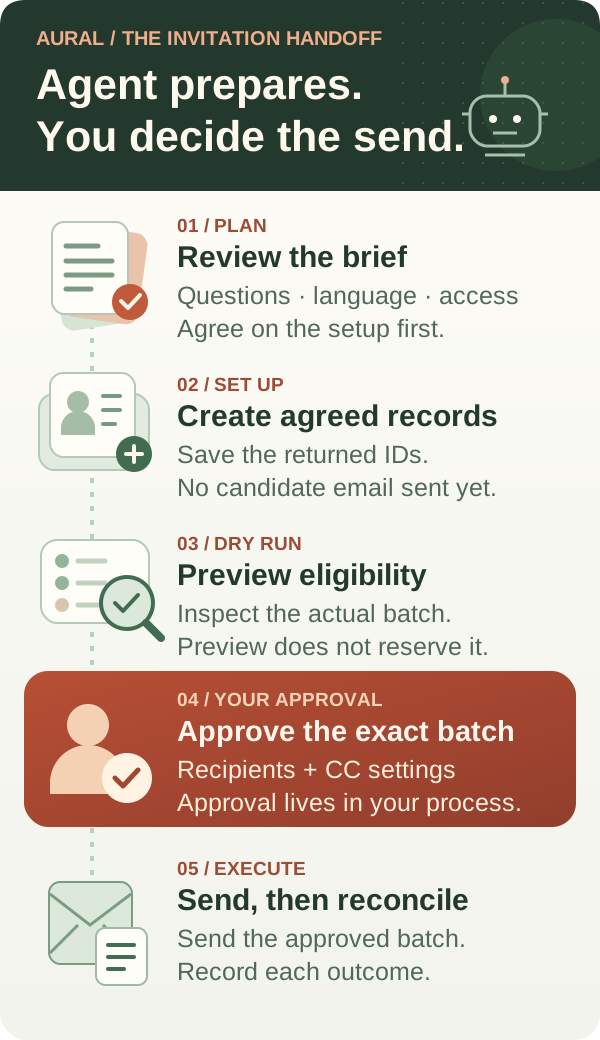
For teams connecting an agent to Aural, there is a concrete design question: what must be reviewed before an interview invitation reaches a person? An agent can prepare a useful proposal while the integration keeps control over which records are created, which links become public, and which emails are sent.
This guide proposes a workflow around Aural’s existing Developer API. The approval step belongs in your integration or operating process. It is not a claim that Aural supplies a built-in agent approval engine.
Separate setup, access, and email
Start with a reviewable interview brief: its objective, questions, language, channels, expected duration, and intended participants. Let a reviewer check it before creating records from unverified agent output. A hiring screen and a research interview may share infrastructure while needing different questions and recipient groups.
Aural exposes separate operations with different effects:
- Create candidate records. The candidates endpoint creates records and returns personal invite links. Creating a candidate does not send an email.
- Publish a public interview link. The publish endpoint activates an interview and turns off invite-only access. Use it when public access is intended.
- Send personal invitations. The invites endpoint sends to existing candidate IDs using their personal links. This flow preserves invite-only access.
For an invitation-only pilot, do not add the public publish operation simply because a generic agent checklist says to “finish setup.” Choose the access model deliberately, then use the matching operations. The API reference documents the endpoints and their request bodies.
Preview the batch you actually intend to send
After the reviewed setup and candidate records exist, call the invitation endpoint with their returned IDs and dryRun: true. This fictional example shows the request shape. Use the IDs returned by your own authorised workflow.
POST /api/v1/interviews/00000000-0000-4000-8000-000000000001/invites
  {
    "ids": ["00000000-0000-4000-8000-000000000002"],
    "dryRun": true
  }
The bulk endpoint accepts 1–100 IDs, defaults to a dry run, and requires a project role of Member or higher. It checks whether each candidate belongs to the interview, has an email and invite token, and has not started a session. Preview results can be eligible or skipped; errors can also produce failed results.
A dry run is a live eligibility check, not a message delivery test or a reservation of those records. Execution checks eligibility again. A candidate may start an interview between preview and send, so an earlier eligible result does not guarantee a later send.
Use the same saved batch as the basis for review and execution. Do not let a second model response silently replace the recipient list when the reviewer approves the first one.
Bind approval to the actual recipients and settings
Make the approval view useful to a busy reviewer. Show the interview title and ID, the questions and channel configuration being used, the candidate names and email addresses, the requested action, and the preview results. Keep the approved candidate IDs with that record.
Check copy recipients too. Aural’s invitation CC setting defaults on, and a configured CC address is visible to candidates. Review whether a copy should be sent and who should receive it before executing the batch.
The integration should record who approved which batch and when. If the recipient list or interview content changes, return the changed proposal for review. Approval of an earlier batch should not quietly authorise a later one.
Keep the API credential in the tool’s execution environment rather than the interview brief or model-generated text. Aural checks the key owner’s accessible projects and permissions; your integration still needs to decide which operations the agent may request. Project access is not the same thing as a person approving an email campaign.
Reconcile outcomes before retrying
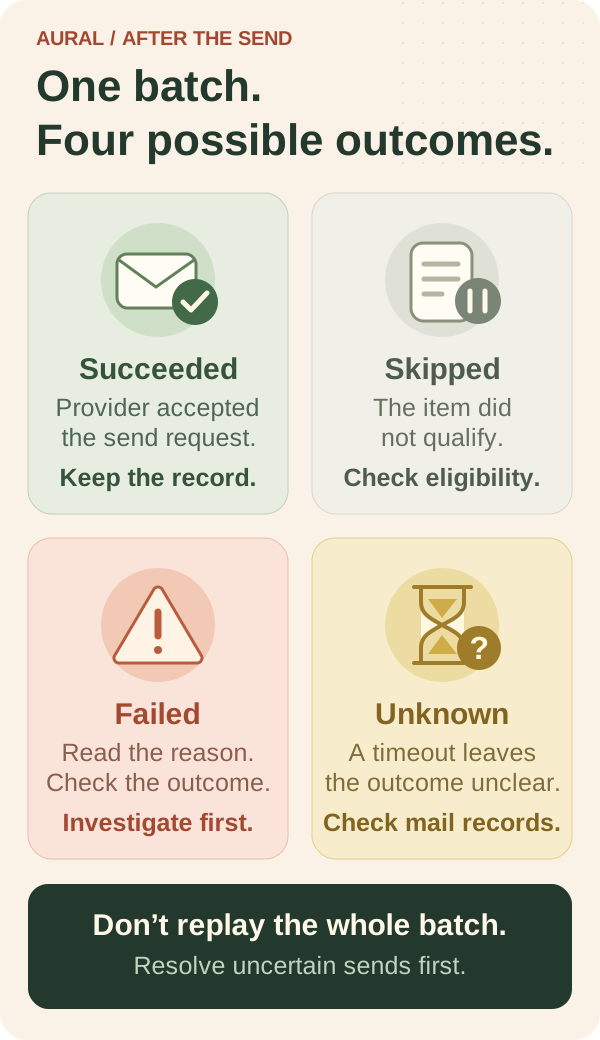
To execute an approved batch, submit the invitation request with dryRun: false. Inspect every item in the returned results. HTTP 200 does not mean every invitation succeeded, and the batch is not an all-or-nothing transaction.
Imagine a fictional three-person batch: one invitation succeeds, one is skipped because the person has already started, and one fails. Replaying all three IDs can send the successful invitation again. Keep the per-item results and investigate the failed item before deciding what to retry.
Email sending is not idempotent. Treat a request timeout as an uncertain outcome, not proof that nothing happened. Check your send ledger and mail-provider records, or pause for human review, before resending. Retry only items you have confirmed were not sent and are still eligible.
A succeeded result means the email provider accepted the send request. It does not prove that the message reached an inbox or was read. Likewise, a candidate record or personal invite link is not evidence that an email was sent. Preserve these distinctions in the agent’s final status update.
Test the handoff with a small pilot
Use an interview you control and a test inbox you own for the first end-to-end run. Check a preview-only batch, an approved send, an ineligible candidate, and a mixed-result batch. In your integration’s own test harness, simulate a lost response after sending and check that it asks for reconciliation instead of replaying the whole batch.
Agree on the status language before expanding the workflow: “candidate records created,” “eligible to send,” “send accepted,” and “outcome unknown” describe different events. A polished agent response should match the evidence behind it.
After a participant completes an interview, the API can retrieve session details and existing reports. Aural’s report endpoint does not generate a missing AI report. Keep result collection as a separate workflow, and have people review the underlying evidence before using summaries in hiring or research decisions.
Start with the Developer API quick start, then review invitation preview and send behaviour. Our interview API guide covers the broader integration workflow.
Try one controlled invitation pilot in Aural. The goal is a handoff that makes useful preparation easy, makes the send decision visible, and reports exactly what happened.