The gap behind the adoption headline
AI use is becoming part of everyday work. The next useful conversation is about what people need to use it well: a clearer starting point, an approved tool, help checking an output, or time to practice.
On September 29, PwC published its 2026 Global Workforce Hopes and Fears Survey. It reports that 64% of respondents used AI at work in the past year, while 51% reported access to learning and development resources, down from 59% the previous year. The survey covered 49,364 workers across 48 countries and regions, with responses collected in May and June 2026. Read the findings and survey methodology.
These are broad, self-reported findings. They do not tell you which obstacle matters in your organisation, or prove that AI use causes better career outcomes. Our practical interpretation: before choosing the next training programme, ask people to walk through an actual task.
A short research interview can make that conversation concrete. It can help a learning team distinguish a missing skill from a missing opportunity to use one.
Start with a task people remember
Choose one workflow: preparing a project handover, drafting a weekly update, reviewing a document, or investigating a recurring support issue. Keep the first pilot narrow enough that you can act on what you hear.
Invite people with different levels of AI use, including people who have not used it for the task. Ask them about the same recent period. Someone who has not tried a tool may still explain a useful constraint: unclear permission, limited access, or no suitable task.
Open with a clear purpose: “We want to understand what would make learning and using AI easier in this workflow. This conversation is about improving support, not rating your performance. Please use generic examples and leave out customer names or confidential material.” Explain who will review the responses and how you will use them.
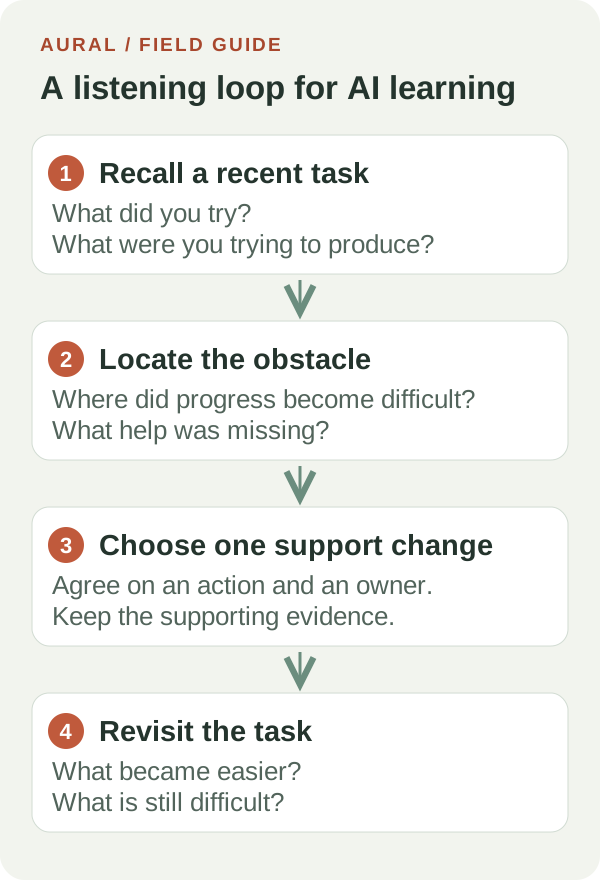
Four core questions, with room to follow up
The following script is an original starting point. Pilot its wording and length with colleagues before inviting a wider group.
- Recall the task. “Walk me through a task from the last week where AI might have been useful, whether or not you used it.” Follow up with: “What were you trying to produce, and what did you do first?”
- Locate the obstacle. “What did you try, and where did progress become difficult?” If the person did not try AI, ask: “What influenced that decision?” Let them describe the reason before suggesting categories.
- Understand the checking step. “How did you decide whether the result was ready to use?” Ask for a concrete check, a source, or a person they consulted. If they did not reach a result, ask what help they would have needed at that point.
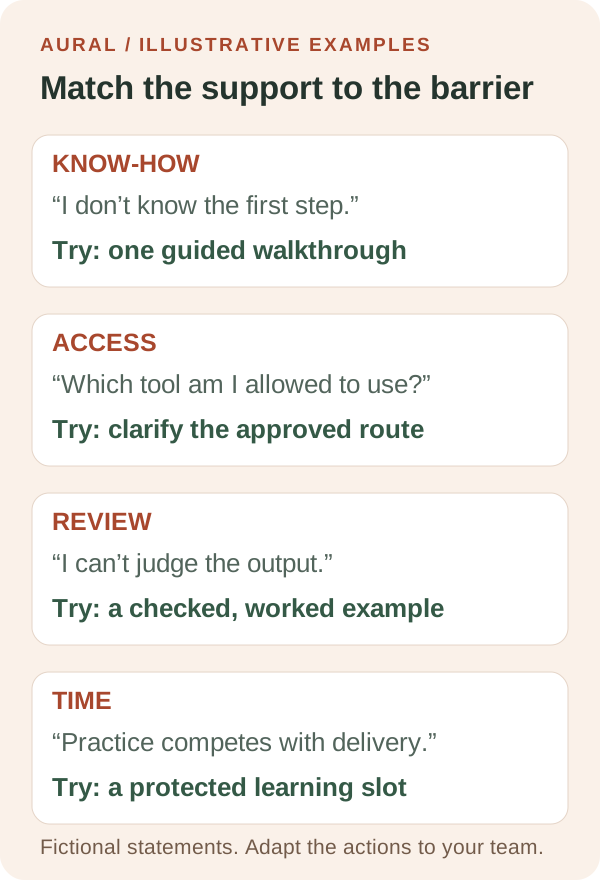
- Choose useful support. “What would make your next attempt easier?” Follow up with: “What would that support look like during the task?” A worked example, tool access, and time with a colleague are different requests.
If the workflow includes an AI agent taking actions, add one relevant probe: “At which point would you want to review or approve its work, and what would you need to see?” Use the answer to identify learning and workflow needs. It is not a test of whether someone deserves access to AI.
A fictional example: the course is not the whole answer
Imagine a project coordinator preparing a handover document. They know how to ask an assistant for a summary, but stop because they are unsure which project material is allowed in the approved tool. They copy and rewrite the notes manually.
A generic “How confident are you with AI?” question could leave that obstacle hidden. A task walkthrough points to a more specific next step: clarify permitted inputs and provide a worked example using suitable material. A prompting lesson might still help later, but it would not resolve the immediate uncertainty.
This is an illustrative scenario, not an Aural customer result. The same research approach could reveal a different need in another team: difficulty checking calculations, no licence for the approved tool, or no time to rehearse a new workflow.
Run the listening exercise in Aural
Create an interview with a clear objective, such as “Understand barriers to using AI when preparing project handovers.” Add your core prompts as Research questions. Aural supports this question type for exploring experiences through follow-ups and producing Research Findings in the session report.
Choose voice or chat to suit the participants. Review the interview language, tone, and follow-up depth in settings, then test the interview yourself. Keep the core prompts consistent across the pilot, while recognising that adaptive follow-ups can differ between people. Check the actual session length before expanding the invitations.
Afterward, review the transcript alongside the AI-generated Research Findings. Those findings organise topics and data points from research questions. Check important statements against the participant’s words before turning them into a recommendation. A summary can miss a condition or make an uncertain statement sound settled.
Aural reports can also contain evaluations and scores. For this exploratory exercise, use the conversation evidence to understand support needs; do not turn those scores into employee rankings. The product helps collect and organise responses. Your team still owns interpretation and the resulting changes.
For setup details, see question types, interview settings, and results and Research Findings. Our user research guide explains the broader workflow.
Turn what you hear into one visible change
Start with a few pilot conversations to improve the script and identify possible barriers. A small convenience sample will not establish how common a problem is across the organisation. Keep a simple review note for each proposed action: the task, the obstacle, the supporting transcript passage, the change, and the person responsible.
Pick one change your team can test. For the fictional handover example, that could be an approved-input guide and one checked sample document. For another workflow, it might be a short practice session with someone who can explain how to verify the result.
Return to the same workflow after people have had an opportunity to try the support. Ask: “What did you attempt this time? What became easier? What is still difficult?” Look at a suitable work example together where possible. Record unresolved questions as well as improvements.
Try a small Research interview in Aural before your next learning plan is finalised. The useful outcome is a specific support change that people can use in their work, followed by a chance to find out whether it helped.