Business context is having a busy week
On October 20, Zoom introduced its Unified Context Layer, describing a way to connect conversation history with relevant documents and data. The same day, Glean introduced Glean for Data Analysis, bringing company data together with the business context behind it. Both announcements put attention on the information surrounding an AI response. Read Zoom’s announcement and Glean’s introduction.
These are product announcements, rather than independent evidence that an AI-generated conclusion is correct. For teams using interviews to understand customers, they suggest a practical question: can a teammate follow a research finding back to what a participant actually said?
A useful summary helps someone find the important parts of a conversation. A research finding also needs its context: who described the experience, which task they were doing, what evidence supports the interpretation, and what remains uncertain. This guide proposes a small review workflow around Aural’s existing research interviews and reports.
Start with a decision you need to make
Choose a decision before writing the interview questions. Imagine a fictional product team deciding how to improve a reporting dashboard. “Do users want better reporting?” is too broad to guide the work. “What do people check before they share a weekly report?” gives the team a specific activity to investigate.
Ask for an actual episode: “Walk me through the last report you prepared.” Follow with questions about what happened next, which information was missing, and how the person checked the result. A request such as “Would you like a one-click export?” introduces your proposed solution before you understand the task.
Record the relevant context in your research plan: role, task, tools involved, and the situation you want to understand. Use neutral participant labels in shared analysis. A finance reviewer preparing a sign-off and an operations manager checking a daily exception may have different needs even when they use the same dashboard.
Use Research Findings as a way into the conversation
In Aural, choose the Research question type when you want exploratory answers and follow-ups. Review the interview’s tone, language, and follow-up depth before inviting participants. The question-type guide explains Research questions, and the settings guide covers the session configuration.
Sessions containing Research questions can produce structured Research Findings. The report organises these by research question, with a summary, Key Topics, and Key Data Points. Use them to identify passages worth examining, then return to the transcript to check the account and its surrounding conversation.
A generated data point may be a paraphrase. Before putting quotation marks around it, find the matching transcript passage and check the wording. If a recording is available, use it to confirm important quotations or ambiguous recognition. Otherwise, describe the source as a transcript excerpt and keep any uncertainty visible.
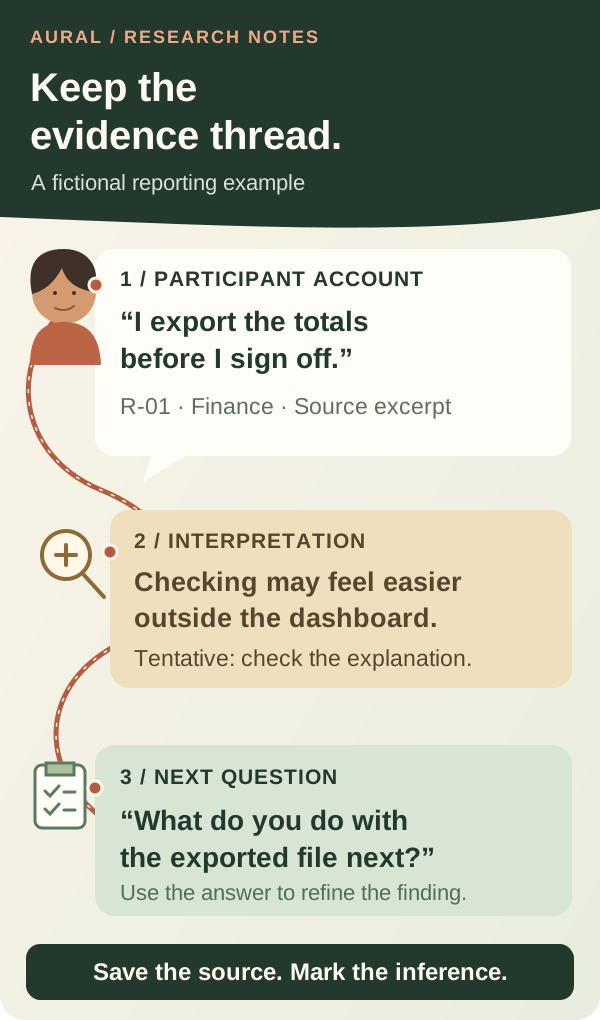
Keep a small evidence sheet alongside the report
For each finding you plan to share, keep a source card in your team’s research notes or spreadsheet. Include the participant label, session reference, question, and a timestamp or other locator where available. Copy the relevant excerpt separately from your interpretation so another reviewer can see how you reached it.
The GOV.UK Service Manual recommends capturing what researchers saw or heard before interpreting observations and deciding actions. That distinction is useful when an AI summary arrives before your team has reviewed the source. Read the analysis guidance.
A fictional source card could contain:
- Participant account: R-01, a finance reviewer, says they export totals before signing off. Preserve the exact excerpt and its source reference in the notes.
- Researcher interpretation: Checking the totals may feel easier outside the dashboard. Mark this as an inference until the participant’s explanation supports it.
- Open question: Is the export needed for checking, sharing, record keeping, or something else? Ask what they do with the file next.
Aural supports XLSX and PDF exports of session results. Use the results and export guide to choose a format for your review. Keep source references with excerpts when moving findings into a planning document, and share participant information only within the access and consent arrangements for your research.
Look for the account that changes your explanation
Now imagine a second fictional participant, R-02, who checks details inside the dashboard and rarely exports. Do not flatten both accounts into “users need export.” Compare the tasks first: what is each person checking, who receives the result, and what counts as finished?
The useful finding may be narrower: these two participants use different checking workflows. That gives the team a better next question than a broad claim about everyone’s preferences. It also keeps a proposed feature separate from the experience that motivated it.
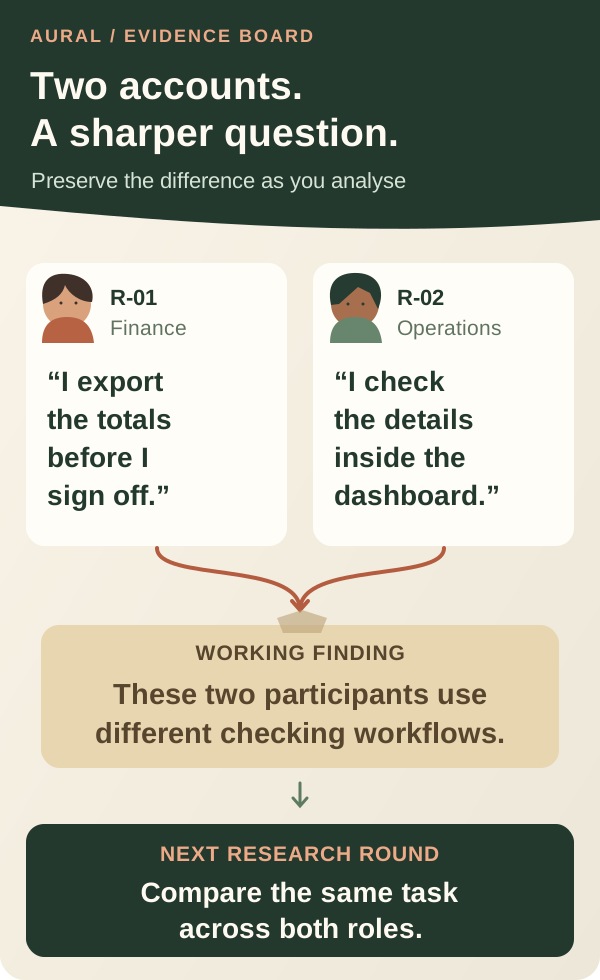
When comparing real sessions, note who was asked the same question and who was not. Several mentions within one conversation are still one participant’s account. If you report a count, explain the group and the question behind it; do not turn a small interview sample into a claim about the whole customer base.
Take one finding into the next round
Before a finding enters the roadmap, ask a teammate to review its source and interpretation. Can they locate the passage? Does it support the wording? Is there an account that points in another direction? Which unanswered question would change the team’s decision?
For the fictional reporting team, the next step could be another interview about the same sign-off task, or a separate usability session observing how someone checks a report. An interview account describes what a person reports doing; direct observation can add different evidence about the workflow.
To try this with Aural, prepare one focused Research interview, review its findings against the transcript, and bring one source-backed question to your next team discussion. The user research guide is a useful starting point. Aim for a finding your team can examine and refine as new evidence arrives.